Posts

Showing posts with the label device

PD Opportunity - Bring Your Own Device Summit (Genesee ISD)

Image
With Bring Your Own Device (BYOD) becoming a major trend in K-12 classrooms, school districts face questions about data security, district policy, classroom integration, and user support. The Genesee Intermediate School District is hosting a BYOD Summit with sessions for district administrators, building administrators, technology leaders, and teachers that address issues, discuss solutions, and generate roadmaps for districts on the BYOD pathway. When: 8:30am - 3:30pm May 12th   Where : 2413 W. Maple Ave; Fint, MI 48507 Credit:  4 SCECH credits available For more information:  https://www.smore.com/1sa21
Conference - Mobile Learning Conference

Image
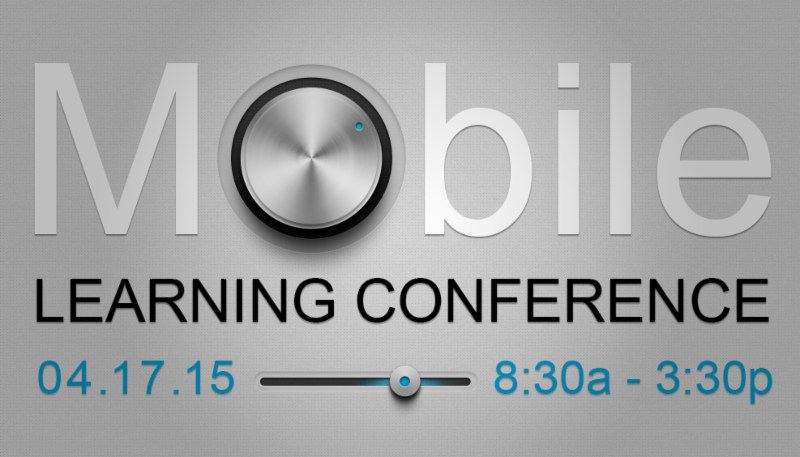
LEVERAGING MOBILE TECHNOLOGY FOR EDUCATION Sponsored by  MACUL , the  REMC Association of Michigan  and  Kalamazoo RESA  Pre-Conference Session : Thursday April 16, 2015 from 4:00-7:00* *Includes digital playground, Google training, and reception at Bell's Brewery. Conference Sessions : Friday April 17, 2015 from 8:30-3:30** **Includes breakfast snacks, lunch and a chance to win technology prizes, including an iPad.  If you are using, or would like to start using mobile devices in your classroom, this is an experience you should not miss. At-a-Glance, Sched.org, and Presenters will be available soon on the  MACUL website. Additional Information :  https://madmimi.com/s/0bfe94   Cost : $65.00 - includes attendance at both pre-conference and conference events/sessions.  Location :  KALAMAZOO RESA;  1819 E. Milham Road, Portage MI Registration : You can register  HERE .

iPads in Education - Connecting Meraki to Apple Deployment

Image
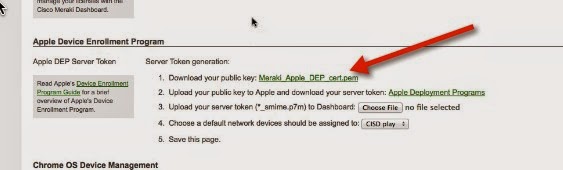
Here are the steps to connect Meraki to the Apple Deployment site. (Prerequisites for this activity: Your district already enrolled in Apple Deployment Your Meraki server initially setup) Start in Meraki -  Go to the side - click on MDM setting under Organization Scroll down the area headed Apple Device Enrollment Program Click to download the Public Key  Go to the Apple Deployment website ( http://deploy.apple.com ) Click on Manage Servers under Device Enrollment Program  Click on the server you added for Meraki. (You will need to Add MDM Server if you have not previously added the server.) Under Server Details, click on Add Key  Find and select the key you downloaded A server token will show up - click to download & save that Click Done Go back to Meraki -  Click on Choose File to upload your server token Make sure to Save Changes at the bottom of the page Here is a video if you prefer that format:  ...

iPads in Education - MDM with Meraki

The vast majority of my morning has been spent "playing" with iPads on Meraki.  This is only my fifth time I have blocked out some hours to work with it, and finally I am feeling like I've made some headway! It's been quite an involved process, and if you are wondering if you should go this route for your MDM solution for iPads there are some pointers I think worth sharing that may help you decide. Items to keep in mind when troubleshooting: It is a multi-faceted process - you have to deal with Apple's DEP and Apple's VPP, in addition to the tools within Meraki;  There are many ways to do similar functions - for instance, you can create & add profiles from within Meraki, or you can create them in iPhone Configuration Utility Tool and upload them, or you can create them in Configurator... you get the picture. Meraki has a definite delay in the data that displays - sometimes you just have to sit and be patient, or even walk away These all contribut...

Google Apps - Sharing a Link to a Form

Image
One of the changes made with Google Forms is the added ability to easily share a shortened URL link with those you want to access the form.  This has impact on users in two obvious ways - it is a nicer way of sharing the link (instead of the LONG URL that is generated when you create a form it is efficient - you no longer have to go through the extra steps of copying and pasting the link into another site to generate a short URL But there is another advantage, as well.  Because it (of course) uses Google's URL shortener, you will also have access to some analytics on the link AND a QR Code for the site you created the link for.  This might be something of value to you! First, how to select the new shortened link - Click on the blue Send Form button (either location) Check the box for the Short URL Google will generate the new URL for you to use To get some basic analytics about the use of the URL, you can go to goo.gl (Make sure you are viewing it in th...

Which is the "Right" Device? Choosing between iPads, Chromebooks & Laptops

Image
I am often asked by people what they should buy for their classrooms - an iPad, a Chromebook or a laptop (I know there are also Android tablets out there, but I haven't been asked about those in the classroom yet!).   This is a very difficult question to answer for several reasons, but mainly due to the fact that we are focusing on the device not the needs.   You see, these are all distinct devices and each serves a different need.   This is not to say that a person has to actually use all three devices, as there is some overlap.   So the questions we should be asking are “What capabilities do our teachers/students/administrators need from their device?” and then “What capabilities might we want our teachers/students/administrators to be able to do in the future?”   If we instead evaluate our needs based on these questions, we get a clearer picture of which device is a best fit.  For instance, if we determine that the need is for web-based service...