Posts

Google Classroom - Co-Teachers Now Allowed!
Image
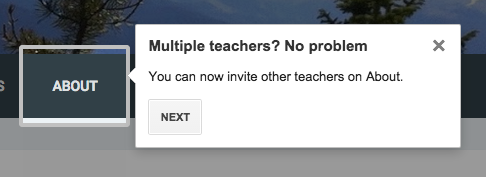
From Michael Partridge's " Pirate Tip of the Week " blog - for you co-teachers that use Google Classroom: You can now have co-teachers. :-) Click the About tab and select the Invite Teacher button on the left side of the screen. Search for and select the teacher you want to add to your course. You can add multiple teachers, however any "teacher" you add has full control of the class and must have a pinckneypirates.org (or whatever your education account is) account.

Resource - USGS Historical Topographic Maps

Thanks for this gem from Greg Miller at Wired - The USGS has a new online map viewer that display maps that cover the entire country and are FREE to download.   Here's from Greg - " Hunting for historical topo maps on the USGS site used to be confusing and annoying. It involved a lot of clicking on what you hoped was the right thing, squinting at the tiny preview maps, and twiddling your thumbs while the enormous full-sized version downloaded. And then starting over when it turned out to be the wrong thing.... Now, browsing and searching for maps is much more intuitive. You can type or zoom in on a particular place, limit your search to maps of a particular scale or from a particular range of dates. You can download them in a variety of formats, from JPGs (fine for printing out a nice map to put on your wall), to KMZ files (to import into Google Earth), to GeoTIFFs (for the power users who wants to import maps into GIS software). There’s even a  YouTube tutorial  that...

Google Sheets - How to Use Filters

Image
Sometimes when working in a spreadsheet you want to see just some of your data that meets a certain criteria.  Many people will resort to either hiding cells or copying the information into another spreadsheet and deleting some of the data.  But there is a better solution for this - filters. When looking at your spreadsheet, the filter is an icon of a funnel - To use the filter, highlight the data you want to filter, then click on the filter icon. This will cause the top row of data (which should be your header information) to turn color and add a little arrow next to each header - Clicking on the arrow, you have several options.  The first is the ability to sort right there, in either direction - The second is the powerful option.  It will have listed every entry choice for that field.  You can turn on and off the choices, so you can display exactly the data you want to see - You can even set the parameters for multiple fields.  The arr...

PD Opportunity - Bring Your Own Device Summit (Genesee ISD)

Image
With Bring Your Own Device (BYOD) becoming a major trend in K-12 classrooms, school districts face questions about data security, district policy, classroom integration, and user support. The Genesee Intermediate School District is hosting a BYOD Summit with sessions for district administrators, building administrators, technology leaders, and teachers that address issues, discuss solutions, and generate roadmaps for districts on the BYOD pathway. When: 8:30am - 3:30pm May 12th   Where : 2413 W. Maple Ave; Fint, MI 48507 Credit:  4 SCECH credits available For more information:  https://www.smore.com/1sa21

Google Search - Useful Tools for Teachers

Image
Google Search does much more than search websites.  It has many features embedded right in.  These are great back-pocket nuggets for when you are in a hurry and don't have time to open another app or pull out your phone: Timer Typing timer into the Google search bar will return a basic timer at the top of the results.   Clicking on the numbers allows you to set it to the desired length of time.  Working in another app?  No problem, it still runs in the background.  And now, there is an icon to make it full screen - so if you are displaying it via a projector for your students it is easier than ever!  Also, a blue bar extends across the bottom showing how much time has been used up. Comparisons You can quickly compare 2 items by doing a search with vs between them.  As of this time, I have not been able to do this with phrases, but have for a variety of one word items.  Compare planets, foods, animals.  A great way to ge...

PD Opportunity - CUE Rock Star Teacher

Image
CUE Rock Star Teacher Camp Saugatuck hosted by MACUL Saugatuck Middle School July 7th to the 9th f rom 9-4 daily.  This isn't a just a tech camp, but three high energy days about putting great teaching first and then enhancing it with technology. It's also an experience where the faculty doesn't present, but facilitates and ensures the attendees are the "rock stars". Last year's event was a huge success and feedback was extremely positive from attendees. The overarching theme from teachers was that they had never experienced PD like that before.  1/6 of last year's group presented at this year's MACUL conference, many for the first time ever. This is proof that the camp's goal of launching new educational leaders is indeed being realized and helping to grow new teacher-leaders across Michigan and the Midwest. You don't have to be looking to become the next great edtech guru though, just looking to energize your teaching...

Google Search - ELA Tips & Tricks

Image
Google Search does much more than search websites.  It has many features embedded right in.  These are great back-pocket nuggets for when you are in a hurry and don't have time to open another app or pull out a reference book. Here area a few ELA related items you can perform right in the search bar: Define a word Starting your search with define followed by the word will bring up a box with the definition at the top of the search results with links for translations, word origins and more definitions. Find books by author Typing in "books by" followed by the author's name in the search bar will result in a bar displaying books by that author at the top of the results list.  Additionally you get biographical information about the author below to the right. Current Events Adding "news:" before a search term will return news stories at the top of the search results.  Translate Type "translate" in the search box to b...