Posts

Showing posts with the label MDM

iPads in Education - Which Version of Meraki Systems Manager am I Using??

Image
If you have used Meraki as the MDM to manage your iPads for the past several years, you - like me - have moved through the transition of being told it would "always be free" to them implementing a paid model but maintaining a legacy version of the Systems Manager for those of certain criteria.  (If that sentence was confusing, you didn't experience the joys of the transition I would guess...) So, how can you tell which version of the Meraki Systems Manager you are using?  How can you tell if you can update for free?  What does updating - if you are able to - do for you? First of all let's review the possible situations you are currently in: You have over 100 devices on Meraki and you have paid for a license You have over 100 devices on Meraki and you have never paid for a license You have fewer than 100 devices on Meraki Now, go check your License Information - click on Organization and then select License Info: If you fall under case #1 you are on the...
iPads in Education - Connecting Meraki to Apple Deployment

Image
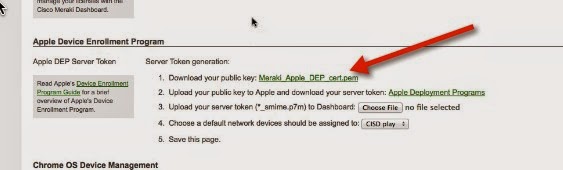
Here are the steps to connect Meraki to the Apple Deployment site. (Prerequisites for this activity: Your district already enrolled in Apple Deployment Your Meraki server initially setup) Start in Meraki -  Go to the side - click on MDM setting under Organization Scroll down the area headed Apple Device Enrollment Program Click to download the Public Key  Go to the Apple Deployment website ( http://deploy.apple.com ) Click on Manage Servers under Device Enrollment Program  Click on the server you added for Meraki. (You will need to Add MDM Server if you have not previously added the server.) Under Server Details, click on Add Key  Find and select the key you downloaded A server token will show up - click to download & save that Click Done Go back to Meraki -  Click on Choose File to upload your server token Make sure to Save Changes at the bottom of the page Here is a video if you prefer that format:  ...

iPads in Education - MDM with Meraki Overview

Image
Here is a graphical overview of setting up for iOS device management with Meraki - Some lessons learned- This process is not linear! You have to touch every iOS device You must log into an Apple ID on every device Some settings conflict - figuring out what can be time consuming BETA is...well...BETA - expect some glitches Note - this is just all the setup!  It doesn't get you into the management of apps at all, just through the steps of getting your devices listed and managed in Meraki. Over the next couple weeks I'll be adding video support for each of the steps via YouTube.  They will also be added to iTunesU under Michigan's MI Learning, with a few companion documents.

iPads in Education - MDM with Meraki

The vast majority of my morning has been spent "playing" with iPads on Meraki.  This is only my fifth time I have blocked out some hours to work with it, and finally I am feeling like I've made some headway! It's been quite an involved process, and if you are wondering if you should go this route for your MDM solution for iPads there are some pointers I think worth sharing that may help you decide. Items to keep in mind when troubleshooting: It is a multi-faceted process - you have to deal with Apple's DEP and Apple's VPP, in addition to the tools within Meraki;  There are many ways to do similar functions - for instance, you can create & add profiles from within Meraki, or you can create them in iPhone Configuration Utility Tool and upload them, or you can create them in Configurator... you get the picture. Meraki has a definite delay in the data that displays - sometimes you just have to sit and be patient, or even walk away These all contribut...