Posts

Showing posts with the label script

Google Script - Create a Multiple Choice Quiz from Questions in a Spreadsheet
Image
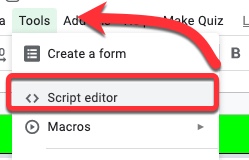
Recently I was asked if there was a way to create a multiple choice quiz from a spreadsheet which had the questions and answers already in it.  A colleague (thank you Andy Mann !) found a script created by Jason Jurotich which we were able to simplify and adapt for our own purposes with the  REMC project  21Things4Students .  Our modified script creates a Google Form multiple choice quiz from the active sheet (the one you are currently looking at) in a Google Spreadsheet.  If you have multiple sheets with questions (say 1 sheet for each chapter), you can create a new quiz just by running the script again on a different sheet!  Below is how to add the script, what it does, and what you may want to modify -   Adding the script 1. First, while in the spreadsheet you are going to use (whether the questions are set up or not), go to the Tools Menu - Script Editor 2. Delete out the code that is there. Copy and paste in the script found in the document...
Google Script: Sending an Approval Email from Form/Spreadsheet Data

Image
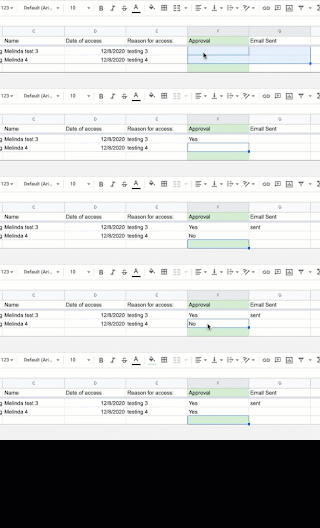
I was asked to create a script that would send an approval email once a request was approved - for 2 separate groups, and to be used for 2 different reasons!  The example below is being used for building access approval (RE: the work-at-home requirements due to COVID-19).  The other way this was used was for approval of spending requests.  These utilize an additional column that is marked (in these cases) with a Yes that will trigger the email, then if an email is sent it makes that notation in the final column.  Note - the script will break (stop running) if someone submits a non-working email from a form, so I recommend having the form auto-collect the email. Here are the directions for using the script -  Creating and Sending the Email 1. Create the spreadsheet  You can either do this with a New Spreadsheet, adding the data fields you want  OR Create a form with the data you are collecting and have it create the companion spreadsheet Important :...

Google Script - Shade a Sheet Row based on Comparison of 2 data points

Image
I have a fairly large spreadsheet we use to track requests for record transfers.  I've discovered recently that some of our larger schools are starting to use it to create internal requests.  This is fine, except when I am skimming through to make sure nothing is being overlooked I end up spending time on these internal requests, when I can bypass them. Hence, a short little script that will compare 2 data points in a row, then shade the row a particular color if the comparison is true. What the Script Does: It compares the values from two different columns to see if the first one is part of the second one - in this specific case it is checking the sending district against the receiving district.  If it is, then the row containing this record is shaded. The Script Here is the script I created to accomplish this - function setRowColor() {     var sheet = SpreadsheetApp.getActiveSheet();     var range = sheet.getDataRange();   ...

Google Scripts - Adding a Template Table to the Top of a Meeting Agenda On Demand

Image
That seems like a weird title for this post, but I was trying to be as descriptive as possible - though the script will work for other uses as well with some easy modifications.  I was posed the following problem by a person at one of our local districts: "Looking for a way for teachers on a [district] Team to be able to click on a link so that this blank template shows up above their prior week's entries. Does this make sense?"  As I have not done much with using scripts in documents, I was eager to try this. Surprisingly, I was able to craft this one in less than 24 hours!  And now, I see a myriad of ways that it could be used in other situations. What this script does :   When opening the document, an additional menu is added (1).  When the user selects to "Add a Table" from the menu, it adds an additional template table (2) below the top level document table, but above everything else.   It also adds a horizontal rule between...

Google Script - Sync Google Calendar to Spreadsheet by Specific Date Range

Image
(This is m odified from Davepar’s project and examples at GitHub https://github.com/Davepar/gcalendarsync which can do a sync either direction.) I had a colleague ask if she could easily copy calendar events into a spreadsheet for a log. We discussed using the Agenda view in calendar, but she needed to do some calculations and data analysis with the information so a spreadsheet was the obvious landing place for the information. After finding (and previously using) Davepar's script to create Calendar events from a Sheet, it made sense to revisit it and break it down the other way. After doing that, it made sense to let the user input the desired date range on the spreadsheet. Here's the result: (Feel free to grab the Script if you want to make your own modifications- this one is an easy one with only 1 line of code to update.) Directions : Part 1 - Set Up the Calendar: Create a new Google Calendar (in the dropdown next to "My calendars" in the le...

Google Script - Making a Form Question from Spreadsheet Data

Image
This is totally a revisit of the post I did on made on October 31, 2016 about " Google Script - Create a Drop-Down List from Spreadsheet Column " I had another use for this today.  I wanted educators completing a form to fill in their district.  Yet the thought of all the different spelling/acronyms I might give was going to make the data analysis crazy.  For people from my organization alone in the first 5 minutes I got Calhoun ISD, Calhoun, Calhoun Intermediate School District, CISD.  Seriously. I remembered this script I used before to create a drop-down from a spreadsheet, and figured I could revamp it for use with a Multiple Choice item - one where people could input their district if it was not there yet using the 'other' option. Viola!  Here it is modified for a multiple choice - much is the same as before, but there are some differences. To do this yourself - 1.  Create your form.   Really important step.  Make sure to cre...