Posts

Showing posts with the label student

The "American Prospect" High School Essay Content

The American Prospect  magazine, in partnership with Omidyar Network, announces the first annual American Prospect Essay Contest.  Many Americans are considering how to create a more inclusive economy. This competition will give high school students the opportunity to read and reflect on one of four renowned books exploring how the economy works in terms of poverty, race, markets, and democracy. The students’ essays will explore where the economy falls short and what we might do about it. Prizes total $30,000: First place for juniors and seniors is $10,000; second place $5,000; third place $2,500. First place for freshmen and sophomores is $5,000; second place $2,500; third place $1,000. Forty honorable mentions will be awarded at $100 each. The  Prospect  will publish the winning essays at  Prospect.org  and feature a selection in the print edition.  The deadline for submissions is  March 31, 2020 . F or further information, go to...
Google Classroom - Adding Guardian Accounts

Image
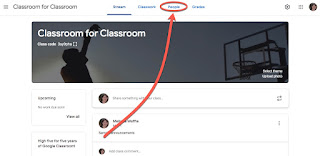
If you are using Google Classroom quite a bit for your students, it is worth taking the time to add the Guardian accounts as a way to communicate home with students.  An important piece worth noting - when you add the Guardians, it ties that email to the student's account NOT your Classroom.  This means if two teachers have the same students only one of them has to add the guardian and it is available for both Classrooms. If you have this feature turned on, parents/guardians that have their email tied to the students can opt to receive an email daily or weekly with missing work, upcoming work that is due, and general information about happenings that week.  They cannot see student work from it.  Important to note - they can be signed up with ANY email (they do not have to have a Gmail account). How to enable and set up Guardian accounts: When in your Classroom, click on the People tab - Click on Invite guardian next the student's name - Start typing in...

Google Classroom - Teacher vs Student Icons

Image
When looking at your classroom list, you may have courses where you have different roles - some you are the "teacher" and some you are the "student."  There are a few subtle difference between the 2 roles, and it helps to know what they are. Item Teacher Student 1. Header Info # of students Student Name 2. Picture none Google Account picture 3. bottom left icon Classroom Gradebook Work for course 4. bottom right icon Google Drive folder for course Google Drive folder for course

Michigan History with MeL

Image
Webinar about Michigan History resources available to you and your students via MeL!  From Christine, MeL K12 Educaiton Specialist -  Help your genealogists, students, researchers, and history buffs by connecting them with best sources for Michigan history. Join us on  October 25 at 3:30pm Eastern for a 30-minute webinar focused on Michigan history resources available through MeL. Learn about tools within MeL Databases which can help your genealogists, students, researchers, and community. Registration is free and open to all Michigan library staff, educators, and other interested users. Read more and  register for this webinar . https://store.mcls.org/index. php/michigan-history-with-mel. html This webinar will be recorded, and made available on demand anytime. http://mcls.org/mel/mel- training-events/ MeL training is funded in part by the State of Michigan through the Library of Michigan. Additional service support comes from th...

Google Classroom - How to Mute (and Unmute) Students

Image
Occasionally students make a poor choice in the comments they post in a Google Classroom class.  While you can easily delete the comments, you can also mute a student for a period of time to prevent them from doing it. There are 2 ways to do this.  Method 1 - from the class stream (single student) Click on the "more options" on the right of the student's comment: Select to Mute them.  The following window will appear, to let you know what this does. Also, you have the option to delete the comment you used at the same time you mute them:  Method 2 - from the class student list (single student or multiple students) Check the box next to the student(s) name(s) (1).  Click on the Actions dropdown (2); select to Mute Again you get the following window to tell you what muting a student does (note: you do not have an option to delete the comment here since you were not initiating it from a comment): A red icon will appear next to the students name i...

Google Classroom - Add "Class Materials"

Image
Many of you may have missed a new feature in Google Classroom - the ability to have an item (or some items) available to students all the time OUTSIDE the Stream.  This can be very handy for a course syllabus or other item you want students to easily reference throughout the course. To add items to this area, you need to go to the About section of your Class - Once you are there, look for a section at the bottom of the page that says Add class materials -  When you click on that area, it changes so you can add the following: 1 - a Title for the section 2 - icons showing you want you can add here 3 - the box to Post it to your current class While there are 4 icons of types of items that can be added, it is technically 3.  1. You can link to items that are in your Google Drive.  (If you select the Attach icon, it actually loads the item to your Google Drive and attaches it the same way as the Drive icon.) 2. Add a general URL link - note that at this...

Student Opportunity - Smithsonian Global Folklorist Challenge

Image
  Cricket Media and Global Learning Network have launched the Second Annual Global Folklorist Challenge , produced in partnership with the Smithsonian Center for Folklife and Cultural Heritage . About the challenge: Who : open to youth aged 8 to 18 worldwide, Task: participants explore a local or regional tradition through the eyes of a community tradition bearer Product: participants create a video or slideshow to share the story Deadline : November 30, 2015 More Information: Challenge Website From the site: "Cultural traditions that students might explore include dance, games, handicrafts, cooking, storytelling, customs, distinctive jobs, and more. Comprehensive supporting materials reinforce real-world folklorist skills by defining terms; providing examples, tips, and organizational tools; and walking students through professional interview and story-shaping processes. In addition, students can have their questions answered by Smithsonian experts. Ac...