Posts

Showing posts with the label template

Google Mail - Setting up & Using Template Emails

Image
There are a few emails that I use on a regular basis - the email body is pretty much the same each time, just a small part of it is changed.  An example is the Technology Tidbits emails I send out when we are doing a series - the only part that changes is the actual tidbit, while the introduction and other information stays the same.  To not have to recreate this email each time (or find an old one and copy and paste it), I have turned on the Email Templates and created a template email to use. 1. How to turn it on: When in your email, go to the Gear icon and select Settings Click on Advanced in the tab options across the top of the settings window - Scroll down the list until you find Templates - Click Enable, and then click the button to Save Changes - 2) How to set up a template: Open a new email.  Compose the standard message you want to turn into a template, just as if you are creating a new message. You can even format the message as desired...

Google Slides - Add Pizzazz by Inserting Diagrams

Image
It's worth noting a new option in Slides - the ability to add some template Diagrams!  It is a fast way to get a great looking diagram in your slideshow.  There are several options, and you have the ability to edit it to suit your style/needs. Here's how to use it - 1. You will find this option under the Insert Menu: 2. When you select it, it will open up your options in a drawer on the right-hand side.  There are 5 different types of diagrams you can create: 3. When you choose which type, you then get additional options in how that type of diagram is displayed: 4.  There is also an option for how many steps/layers/levels are a part of the diagram: 5.  Once you click on the template diagram, it will load onto your current slide: 6.  You can customize the diagram by clicking on various parts of it: 7.  Occasionally a couple parts are grouped together.  In my example the line on the color bar and the corresponding text are...

Google Sites - Embed a Twitter Stream (on the New Google Sites)

Image
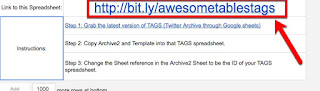
We have several schools/teachers that have been updating their websites to the newer version of Google Sites, and one of the most common questions I have been getting is how can they have a Twitter stream on the site?  The simple answer is...it's complex. In fact, until about a month ago, I didn't even think it was possible.  Then I stumbled across this video tutorial by Ben Wilkoff on just this.  (It is a paired down version of his longer (27 minute) video if you want to watch it slower.) Here's my contribution - a step-by-step screenshot tutorial.  It's a bit long, but it does the trick! 1. Start by going to Ben's template sheet - this provides the simple directions and templates needed (the link is also at the top of the sheet as seen here): 2. Make a copy of his template sheet to have your own copy (and so you can complete this process) - I recommend renaming it. 3. Grab and setup the latest version of TAGS (Twitter Archive through Google Sheets)....

Google Drive - Moderated Templates in the Template Gallery

Image
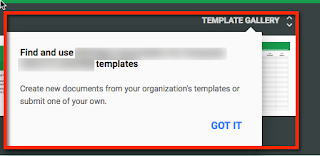
Back in December I blogged about the new Template Gallery in Google Docs, Sheets & Slides .  (By the way, it also works with Google Forms now!) You may be in an organization that moderates the templates submitted to the gallery - this can be especially helpful in a larger organization where it would get overwhelming quickly if everyone tried to add personal templates (what I consider templates that only the creator would use, not everyone in the organization or even departments within the organization). If this is the case, when you submit a template you will get the following message: This will trigger an email to your Google administrators that have access to applications.  Once they approve or deny your request, you will get one of the following emails as confirmation:  For a decline:  For an approved request: If the request was approved, then the template will be available to everyone in your organization going forward.  If you are an ...

Introduction to the NEW Template Gallery in Google Docs, Spreadsheets & Slides

Image
Finally!  We have access to the new template gallery in Google Docs, Sheets and Slides. From any Google account you are able to access it - but it may not be as intuitive to get to as the "old" template gallery was.  You need to go to the landing page for that TYPE of document, which I find many people still don't know about.  So, go to: docs.google.com for your Documents sheets.google.com for your Sheets slides.google.com for your Slides forms.google.com for your Forms The first time you go to these, you will get a message about the Template Gallery: After that, you will both see a top bar with existing templates AND a link in the upper right that says Template Gallery. Now if you belong to a Google Apps for Education organization, and templates are enabled, you have a couple additional options not available with a general Google account. 1. You will have a choice of General templates or your organization's templates 2. You will also see a choi...