Posts

Showing posts with the label enrollment

Google Classroom - Join a Classroom Via Email Invitation
Image
As more educators begin to use Google Classroom, it seems as if Google keeps updating it and adding features. Here are some updated posts with the newest Classroom look. To join a classroom from an email invitation sent by the course instructor, first find and open the email in your inbox: When you open the email, you will see a message similar to the following - look for the blue Join button in the middle.  Click on that - This will both enroll you into the course and open the course up for you.  You may get a brief tutorial if it is your first time using Classroom, or if they have recently made changes.  
Google Classroom - Class Code Options

Image
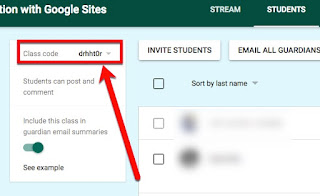
By far the quickest and easiest way to enroll students into your Google Classroom Class is through self-enrollment with the Class Code.  There are several options you have with the Class Code that are hidden in a drop-down you should be aware of. 1. Display : display the class code for projection so your students can easily see it.  You can even click the icon to have it go full screen: 2. Copy: copies the class code unto the computer clipboard. 3. Reset: will reset the code to a new one if needed.  (Note: after disabling your class code, if you Enable the class code back on it will automatically provide a new code.) 4.  Disable : disables the use of the class code. So, for instance, if all your students are enrolled and you don't want the code shared out so "others" lurk in your class.