Posts

Showing posts with the label document

Google Scripts - Adding a Template Table to the Top of a Meeting Agenda On Demand

Image
That seems like a weird title for this post, but I was trying to be as descriptive as possible - though the script will work for other uses as well with some easy modifications.  I was posed the following problem by a person at one of our local districts: "Looking for a way for teachers on a [district] Team to be able to click on a link so that this blank template shows up above their prior week's entries. Does this make sense?"  As I have not done much with using scripts in documents, I was eager to try this. Surprisingly, I was able to craft this one in less than 24 hours!  And now, I see a myriad of ways that it could be used in other situations. What this script does :   When opening the document, an additional menu is added (1).  When the user selects to "Add a Table" from the menu, it adds an additional template table (2) below the top level document table, but above everything else.   It also adds a horizontal rule between...
Google Docs: Reorganized Breaks

Image
A small update has happened in Google Docs.  The Page break and Column break have now been grouped together into a sub-menu called Break .  They can still be found under the Insert menu. 

Google Drive - Adding Images

Image
Recently there was an update making it easier to add Images in Google Docs, Slides and Drawings.  Here are some screenshots of the new drop-down menu and what each option results in. Upload from computer When you select this: You get the standard pop-up window where you can select the image from a location on your computer. Search the web When you select this: A sidebar opens on the right side of the window, with a search bar at the top for you to find an image without leaving your document/drawing/slideshow.  Drive When you select this: You again get a sidebar in the right side of the window with direct connection to your Google Drive, so you can easily find and use the image.  Photos When you select this: You again get a sidebar in the right side of the window with direct connection to your Google Photos, so you can easily find and use the image. By URL When you select this: You get a pop-up window where you can paste in th...

Google Drive - Transferring Ownership of Documents

Image
Today I asked about transferring ownership of documents in G Drive.  There are five ways I know of to change ownership of files. It occurred to me I should share here in case others are asked (or wonder) about this also! I've outlined them below, because some will depend on G Suite administrators being involved, and some depend on the number of files to be moved. Here the ways: Copying the file - done by you (or currently user) by going to the File menu on a file you have edit rights to, and creating a copy (what you are currently doing)  This by far the most tedious if it involves more than a couple files.  It actually makes multiple copies of the file, each with its own ownership.  The best use of this method is for when a document is wanted by another person, but the creator also still needs the file. Switching ownership - the   current owner   of the file goes into the share settings and changes the access right of another editor to own...

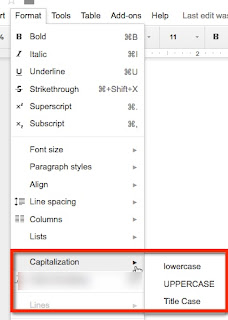
Google Docs - Change of Case

Image
Change of case is now available when working in Google Documents! Check it out if you haven't seen it -