Posts

Showing posts with the label posts

Google Classroom - Using the Stream for Announcements Only!
Image
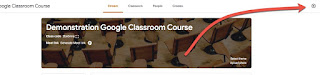
Organization is huge for Google Classroom - both for you and your students.  One key can be ONLY using the Stream for announcements.   (Here is the short video for this topic: Using Your Stream for Announcements .) Designating and setting up your stream as only being used for announcements keeps it "clean" and allows students to easily find past announcements - they are not buried among other notifications.  To do this, you will want to change 2 of your classroom settings. First, go to the G Classroom settings by clicking the Gear in the upper right corner Second, change the following 2 items shown in the box below -  1. Make the stream so students cannot add new posts by selecting either of the other 2 options (that students can only comment OR only the teacher can post and comment) 2. Hide all notifications of classwork from the stream This will simplify your stream so that only posts YOU (and any co-teachers) add show up.   Thank you for joining us ...

Google Classroom - Reuse Post in Stream

Image
Did you know you can reuse your posts in Google Classroom?  And you can use them from any course that you teach?  To reuse a post, when you are in the stream click on the double arrow at the right side of the textbox where you can add a new post - When you click on it you get a pop-up which gives you a few options from where to select a previous post  - 1 - you can select a post from within the course. 2 - you can back up to a list of all of your courses to select to grab it from another course - When you click on a different course from this list, it will display the posts in that course -

Google Classroom - New Features

Image
Yesterday I noticed that several of the new features were enabled on our domain for Google Classroom.  Here are a few of the changes you might want to know about if you are just getting back in after summer break: 1. "New way to post to your stream"  Along with a new way to post, there are new icons in lower right corner - Reuse post, Create question, Create assignment, Create announcement 2. "Bump posts" - push any post back to the top 3. "Create Question" - create a form like question on the fly in your stream  4. "Calendar view of work" - view due dates for items from classroom in a calendar view. In addition to the view within Classroom, a secondary calendar is created in the user's calendar