Posts

Google Mail Security Features

Image
As you get ready for the new school year and begin using your school email more, you may notice some new-to-you message appearing.  These are designed to help you ensure that you are sending information to the correct emails - preventing you from sending sensitive information to the wrong person OR the wrong email address! The first is a "did you mean...?" warning.  Often you may have multiple emails for the same person - This seems to pop up when you are sending to multiple people, and one of the people you are sending to has multiple emails at different domain extensions - and the one you are not using matches the other person/people you are sending to.  Above, I selected Dan's .com email but John's .org email.  Since I have another email for Dan that is .org, it prompted the Did you mean question.  The second is a warning when you are sending to someone outside your domain that is not in your contacts - Again, a great way to prevent sending sensitiv...

Google App Launcher Is Getting an Update!

Image
Heads up! The Google App Launcher, also known around here as the "waffle" (here's where I chuckle), is going to see an update next week on August 1! According to the G Suite Update Alerts, it will change from this: to this: If you have already customized yours, the change will NOT go into effect.  (Many of you Google users don't know that you can re-arrange the icons in the launcher to a layout you prefer-you can still do this if you want a different order than the default.)

Calhoun's 2017 Inclusive Learning Conference

Registration is open for the 2017 CISD Inclusive Learning Conference -  What's best for Kids? What's next for me?  When : August 10 & 11 Where : Battle Creek Area Math and Science Center Cost:   Online/Pre-pay Registration - $40; At-the-door - $45 For more information, please go here .    To see the conference schedule and session descriptions, please refer to the tabs on this spreadsheet . There is something for everybody at this conference!

#miGoogleFEST This August in Grand Rapids

Image
If you haven't been to a GoogleFEST, here's your opportunity!  This is a great way to get professional and personalized learning from Google Experts, CDW Staff, Google Certified Instructors and Google using teachers.  You can check out the schedule of sessions on the website .    From the MACUL Office -  Don't miss # migooglefest this Aug 8 & 9! Hotel discount available thru July 15. Register & book now http:// googlefest.macul.org

Google Script - Create Calendar Events from Spreadsheet Data

Image
Yesterday I shared how I added reminder dates to a spreadsheet for a person in my department who keeps track of software subscriptions.  Today I'm sharing how we take the entries on that spreadsheet and create calendar events, so the reminders are built into her calendar. Here are the steps to create calendar events from spreadsheet data: 1. Either open the spreadsheet with the data (or create a new spreadsheet & populate it with data). This is the spreadsheet where I first added the script to add a "remind date" (yesterday's post). 2.  Open the Script Editor Go to the Tools Menu and select Script editor 3. Replace the Code Replace the default code - with this - (all the text highlighted in gray -  including the final bracket) function createCalendarEvent() {   var sheet = SpreadsheetApp.getActiveSheet();   var calendar = CalendarApp.getCalendarById(' calendarID ');     var startRow = 2;  // First row of data to pr...

Google Script - Setting up Reminder Dates

Image
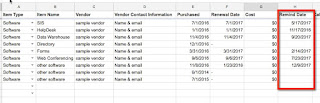
A person in my department keeps track of software subscriptions, and asked if there was a way to automatically have it provide a reminder 45 days prior to the renewal dates.  I said sure! Once I set up the addition of a "reminder date", I modified an existing script to have it write that to her calendar.  So now she simply inputs the vendor information, purchase date & renewal date, and then the scripts calculate the reminder date and adds it to the calendar.  It seems to work pretty slick! Here are the steps to create the reminder dates with a script - 1. Create the spreadsheet where your data will reside. This can be a stand-alone spreadsheet, or it can be one that is populated by a form.  Here is my sample- 2. Open up the Script editor Go to the Tools Menu and select Script editor 3.  Replace the code Replace the default code - with this - (all the text highlighted in gray include the final bracket) var dateIndex = 6; //cell with ...

Google Forms - Interactive User Experience

Image
This is a really cool video on how to make your Google Form interactive - or, if you will, "Choose Your Own Adventure!"  I can think of so many applications for this...both as a teacher, and as a learning activity for students.