Posts

Opportunity: Math Contest
Image
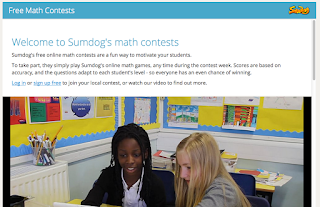
For math teachers in Calhoun County - (Not an educator in Calhoun County, Michigan? There are local contests at various locations; you can visit the website to view a schedule) Sumdog's math contest for Calhoun County starts Friday February 26, 2016 and will run until the following Thursday . Cost: It's free to take part and there are plenty of prizes to be won! Levels: Suggested grades K-8 When: Students can play online either at school or at home using the website or the app! In order to join in the fun, teachers can enter their class here: http://www.sumdog.com/enter_ contest For any questions, contact info@sumdog.com
Google Sites - Adding Hyperlinks to Your Pages

Image
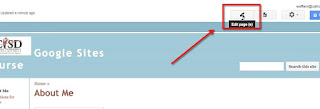
Adding hyperlinks to your website is the best way to connect to additional content without cluttering up your page.  There are two different ways we will look to hyper link here. First, before you begin, you need to make sure your page is in Edit mode.  If it isn't, click the pencil to put it in Edit mode so you have the formatting toolbar.   Once in editing mode, highlight the text you want the hyperlink connected to.  (It does make your page cleaner and easier to read if you link text rather than putting the URLs within the text of your page.)   The first way you can hyperlink is between pages within your site.  In Google Sites, this is the default it displays in the linking pop-up.  To link to another page on your site, you can either type it in the search bar OR you can click through your pages in the list provided to find it:   Once you select it, you would click ok and the hyperlink will form between the current pa...

Opportunity for Michigan Educators - Cyber Innovation Center Resource Showcase

Image
Just received this.  I think it would be a great opportunity to attend! Cyber Innovation Center Resource Showcase ...for teachers and admins. Feb 11, 8:30 a.m. to 3:30 p.m. , Aeronautic Building Capital City Airport, Lansing, MI.  Share with middle/high school teachers (math, science, tech, CTE). Opportunity for integration into ongoing and emerging programming for open education resources. Registration and info: http://goo.gl/forms/ti6q4YABRS

Google Calendar - Easily Adding Multiple Events to a Secondary Calendar

Image
One of my frustrations was when I wanted to add a bunch of events to one of my secondary calendars.  This happens a lot when I am creating a calendar for an online class I am going to teach - I try to post a calendar of when modules open, suggestions of completion dates to stay on target, and any other events I think they should know about.  If you are in the regular calendar view, you can add the events and change the calendar in the pop-up window: But I'm about eliminating clicks, so when adding lots of events to a different calendar I think that method is cumbersome and tedious.  Well, there is a quicker way! If you click on the arrow next to the calendar you want to add the events to to get this menu: Select Display only this Calendar in the list: This will unselect all other calendars - you will note that the color boxes next to all the other calendars go white. When adding events with only that calendar displaying, it will default to those even...

Google Drive - One File, Multiple Places

Image
Because Google functions with labels instead of actual folders, any file can have multiple labels attached to it.  This is very powerful in keeping my Drive cleaned up, I find, as it means that I can maintain one copy of a file but still have it shared with multiple groups of people that are separate from each other.  Here is how you do it.  When in your Drive, highlight the file or folder on the right and then hit the Shift + Z keys.  A pop up will appear - very similar to the "Move to" pop up, but you may notice it says "Add here" instead: Then you can double-click on your My Drive to display the folders inside, and continue clicking through until you find the folder you also want the file to be displayed in.  When that folder is highlighted, clicking on Add here will also display it in that folder (in addition to where it is currently).  A couple points with this: The file will combine the share settings of all folders it is in.  So if each...

Google Drive - Searching for Items Part III

Image
The last couple days I've shared the general way to think about Google files and searching ,  and about the Advanced search bar hidden at the top of Google Drive.  Today let's talk about Boolean operators. Boolean operators are something that can help you narrow your search.  A Boolean searching " is built on a method of symbolic logic developed by George Boole." OR is the most common Boolean.  In fact, you use it every time you do a search with multiple words!  When you type in two words in the search bar, by default it is finding every file that has either one of those terms.  The number of results returned to you can be overwhelming when using OR (either on purpose, or by default if you use several words in your search), so knowing additional Boolean operators can be keep to finding exactly what you want. Let's look at a search so we can compare how these work.  Here's my general search in my drive for the terms blended learning: ...

Google Drive - Searching for Items Part II

Image
Previously I talked generally about how to think about searching within Google Drive.  Today I'd like to go through using the Google Search Bar. Just about everyone is familiar with the Google Search Bar.  It resides at the top of your Google Drive.  It is actually found at the top of just about every Google App. Most people, when searching for a document, will type multiple words into the search bar.  This can result in a lot of frustration as they often get too many results!  Let's talk about ways to get better results.  In fact, let's talk about that little arrow next to the magnifying glass in the search bar because that is one key to better searching.  Enter the advanced search: Using this will yield you much better results as you can better target your search. Some key pieces that most people file helpful: Type: Usually you know the type of file you are looking for.  By selecting the type in the advanced search, you can elimina...